

Download PDF Unshare – Secure PDF Protection Tool for Windows, Mac, Android & iOS
PDF Unshare is a powerful, user-friendly PDF protection program designed to secure your sensitive documents from unauthorized access, sharing, editing, and copying. This software transforms standard PDFs into locked, device-specific files that can only be opened on a single PC or mobile device. With advanced features like password protection, expiry dates, watermarking, and screenshot blocking, PDF Unshare ensures your confidential files remain private and secure.
Whether you're a business professional, educator, or content creator, this tool helps prevent leaks and unauthorized distribution. It supports multiple languages, making it accessible worldwide. Download PDF Unshare today to protect your intellectual property with confidence.
Advanced Security Features That Set PDF Unshare Apart
PDF Unshare goes beyond basic PDF encryption by offering a comprehensive suite of security features tailored for real-world document protection. Unlike standard PDF tools that only apply passwords, PDF Unshare ensures that your files are locked not just by credentials but by device-specific access. This means a protected PDF can only be opened on one authorized device—be it a Windows PC, Mac, Android phone, or iOS tablet—making it nearly impossible for others to share or copy the content. The software also allows you to set an expiry date for your document, ensuring it becomes inaccessible after a specific time. This is particularly useful for time-sensitive materials like contracts, exam papers, or presentations.
Another standout feature is the ability to add dynamic watermarks in various colors and text styles. Whether you want to display your company name, “Confidential,” or a custom message, the watermark appears on every page, deterring unauthorized use. Moreover, PDF Unshare blocks screenshots, a crucial protection layer that prevents users from capturing the document’s content through screen captures—something many other tools overlook.
This feature is especially beneficial for protecting sensitive training materials, proprietary reports, or digital course content. The software also prevents copying of text and images, ensuring that even if someone manages to open the file, they cannot extract or reuse the content. These combined features make PDF Unshare a robust solution for individuals and organizations seeking end-to-end document security.
Additionally, the tool supports multiple languages, including English, Spanish, German, French, and Chinese, enhancing accessibility for global users. This multilingual support is seamlessly integrated into the interface, allowing users to navigate the software effortlessly regardless of their native language. With a clean, intuitive design, PDF Unshare ensures that even non-technical users can apply advanced protections without confusion. The software also provides real-time feedback during the protection process, showing exactly what restrictions are applied. Whether you're protecting a financial report, a creative portfolio, or a legal document, PDF Unshare delivers peace of mind with every file you secure.
Easy Installation & Simple Usage for All Users
Getting started with PDF Unshare is straightforward, thanks to its streamlined installation process and intuitive interface. Whether you're using Windows, Mac, Android, or iOS, the setup is quick and hassle-free. On desktop platforms, simply download the installer from the official website, run the file, and follow the on-screen prompts. The installation wizard guides you through each step, requiring minimal user input. Once installed, the application launches instantly, presenting a clean dashboard where you can upload your PDF files with just a few clicks.
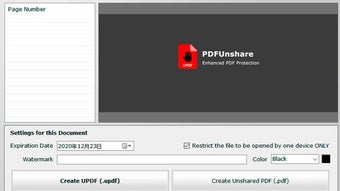
Using PDF Unshare is as simple as selecting a file, choosing your desired security settings, and applying protection. The software offers a step-by-step wizard that walks you through each option: setting a password, defining an expiry date, adding a watermark, and enabling screenshot blocking. You can preview the final output before confirmation, ensuring all settings are correct. The interface is designed with clarity in mind—buttons are clearly labeled, and tooltips provide helpful explanations for each feature. This makes the tool ideal for users of all experience levels, from beginners to advanced professionals.
For mobile users, the Android and iOS apps are available via the Google Play Store and Apple App Store, respectively. The mobile version mirrors the desktop functionality, allowing you to protect documents on the go. You can upload files from your device’s storage or cloud services like Google Drive or iCloud.
The app also supports offline protection, meaning you don’t need an internet connection to secure your files. After protection, the file is saved directly to your device, ready for sharing via email, messaging apps, or cloud platforms. With consistent performance across all platforms, PDF Unshare ensures a seamless experience whether you're working from your laptop or smartphone.
Compatibility & System Requirements Across Devices
PDF Unshare is built with cross-platform compatibility in mind, ensuring broad accessibility across modern operating systems. The software supports Windows 7 and later, including Windows 10 and Windows 11, making it suitable for both home and office environments. For Mac users, it runs smoothly on macOS Mojave (10.14) and higher, including the latest macOS Sonoma. This wide range of support ensures that users on older and newer Mac systems can protect their documents without compatibility issues.
On mobile devices, PDF Unshare is available for Android 8.0 (Oreo) and above, as well as iOS 12 and later. This means even users with older smartphones or tablets can take advantage of the tool’s protection features. The mobile apps are optimized for touch interfaces, with responsive buttons and swipe gestures for easy navigation. Additionally, the software maintains consistent performance across devices, with minimal battery usage and fast processing times. Whether you're protecting a 5-page report or a 200-page manual, the tool handles the job efficiently without slowing down your device.
For users concerned about privacy, PDF Unshare does not require account creation or cloud storage during the protection process. All file processing happens locally on your device, ensuring your sensitive data never leaves your control. This local processing is a major advantage over cloud-based alternatives that may store or scan your files. The software also supports batch processing, allowing you to protect multiple PDFs at once, saving time for users who manage large volumes of documents. With its lightweight design and efficient resource usage, PDF Unshare is a reliable choice for anyone seeking a secure, device-specific PDF protection solution.
Pros & Cons: Is PDF Unshare Right for You?
- Pros:
- Device-specific protection limits file access to one PC or mobile device
- Blocks screenshots and text copying for maximum security
- Supports expiry dates to automatically disable access after a set time
- Customizable watermarks with color and text options
- Available for Windows, Mac, Android, and iOS – full cross-platform support
- Local processing ensures no data is uploaded to the cloud
- Simple, intuitive interface suitable for beginners
- Supports multiple languages for global accessibility
- Cons:
- Only one device can open the protected file, which may limit flexibility
- No cloud sharing integration within the app (must use external services)
- Advanced features require a paid license (free version has limited functionality)
- Does not support PDF editing after protection (files become read-only)
- Mobile app may require occasional updates for OS compatibility
Frequently Asked Questions (FAQ)
Can I protect a PDF file so it can only be opened on one device?
Yes, PDF Unshare allows you to lock a PDF so it can only be opened on a single device—be it a PC, Mac, Android phone, or iOS tablet. This device-specific protection prevents sharing and unauthorized access, ensuring your document remains secure.
Does PDF Unshare block screenshots?
Yes, one of the key security features of PDF Unshare is screenshot blocking. Even if someone opens the protected PDF, they cannot capture the screen content through screenshots, preventing content leaks.
Can I set an expiry date for my protected PDF?
Absolutely. PDF Unshare lets you define a specific expiry date for your document. After that date, the file becomes inaccessible, making it ideal for time-limited materials like exam papers or temporary contracts.
Is PDF Unshare available for mobile devices?
Yes, PDF Unshare is available for both Android and iOS devices. You can download the app from the Google Play Store or Apple App Store and protect your documents on the go.
Do I need an internet connection to protect my PDFs?
No, PDF Unshare performs all protection processes locally on your device. You do not need an internet connection to secure your files, which enhances privacy and data security.
Final Verdict: A Must-Have for Document Security
PDF Unshare stands out as one of the most effective PDF protection tools available today. Its unique combination of device-specific access, screenshot blocking, expiry dates, and customizable watermarks makes it a top choice for anyone handling sensitive information. Whether you're a freelancer protecting client documents, a teacher distributing exams, or a business owner sharing confidential reports, this software delivers reliable, real-world security.
While it does have some limitations—such as restricting file access to a single device and requiring a paid license for full features—the benefits far outweigh the drawbacks. The tool’s ease of use, cross-platform availability, and local processing make it a secure, privacy-first solution. If you're serious about protecting your PDFs from leaks, copying, or unauthorized sharing, PDF Unshare is a smart investment.
Download PDF Unshare today and take full control of your document security. Protect your intellectual property with confidence—only with a secure, trusted tool built for real protection.







